.png)
Bypassing the Pre-Boot Wall: Why Native Motherboard M.2 Slots Can't Handle Redundant OS RAID
For system integrators, edge architects, and enterprise IT departments, establishing a resilient boot volume is the foundation of system uptime. If the OS drive fails, the entire node goes offline—regardless of how powerful the host processors or secondary storage arrays are.
To protect against physical drive failures, the industry standard has long been “mirroring”: running two identical storage drives in a redundant RAID 1 array.
However, system builders transitioning to modern PCIe Gen5 platforms are running into a frustrating engineering roadblock: native onboard motherboard M.2 configurations are structurally limited to single-drive booting, making a robust pre-boot RAID 1 environment nearly impossible to deploy natively.
Understanding why this pre-boot wall exists—and how to bypass it—is essential for building reliable workstation and edge server architectures.
The "Operating System Boot RAID" Catch-22
The core issue stems from a fundamental conflict in PC storage architecture: standard software-defined RAID solutions require an active operating system to execute, but the motherboard needs to boot from the RAID array before that operating system can load.
This architectural limitation manifests in three primary ways on native motherboards:
1. The OS Dependency: Popular, high-efficiency software RAID utilities (such as Microsoft Disk Management, Windows Storage Spaces, or Linux mdadm) are incredibly stable once initialized. However, because they run inside the operating system kernel, they do not exist when the computer is first powered on.
The motherboard's basic UEFI BIOS cannot read or compile these complex software-defined mirrors on its own. As a result, native ports are restricted to presenting individual, un-mirrored drives to the bootloader.
2. Proprietary BIOS Lock-In (Intel VROC & AMD RAIDXpert): To work around this, some motherboards offer onboard firmware-level RAID (such as Intel VROC or AMD RAIDXpert). However, this introduces severe deployment and maintenance challenges:
Hardware Lock-In: A bootable array configured via AMD RAIDXpert is tightly bound to that specific AMD platform. If the motherboard fails, you cannot simply move those drives to an Intel-based system—or even a newer generation AMD motherboard—to recover the operating system.
Licensing Friction: Features like Intel VROC frequently require purchasing physical hardware keys (dongles) or specific enterprise processor tiers just to unlock basic RAID 1 boot functionality for third-party NVMe SSDs.
3. No Universal Native Driver Support: Standard Windows or Linux boot media rarely contain the proprietary, vendor-specific RAID drivers needed to recognize a motherboard-configured firmware array. This forces deployment teams into complex driver-injection workflows, slowing down hardware rollouts and increasing deployment failure rates.
The Solution: Onboard UEFI-Compliant Boot ROM
To establish a redundant, high-performance Gen5 boot array without these limitations, the system needs independent pre-boot intelligence. This is exactly why professional system builders utilize dedicated Add-In-Cards (AICs) equipped with an onboard, UEFI-compliant boot ROM.
By moving the RAID management off the motherboard and onto a dedicated controller, the entire pre-boot environment is simplified:
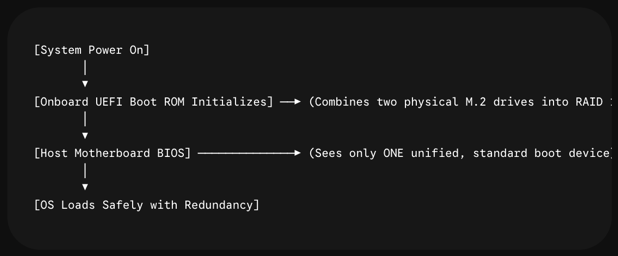
True Pre-Boot Device Recognition: The dedicated UEFI ROM initializes the RAID array before handing control over to the motherboard BIOS. The host system simply sees a single, standard, bootable NVMe device. No complex motherboard BIOS settings are required.
Platform Independence & Array Portability: Because the RAID metadata and array structure are recorded directly onto the hosted NVMe media, the boot volume is completely independent of the host chipset or motherboard architecture. A bootable RAID 1 volume created on an Intel workstation can be physically moved alongside the Rocket 7602L and used to boot an AMD edge server, or vice versa.
Seamless OS Deployment: High-efficiency, integrated driver support ensures that Windows and mainstream Linux distributions recognize the unified boot target immediately during initial installation, eliminating the need for custom driver integrations.
Enter the Rocket 7602L: The Professional Gen5 Boot Framework
Engineered specifically to solve this pre-boot bottleneck, the HighPoint Rocket 7602L Dual M.2 PCIe Gen5 x16 Low-Profile Bootable RAID AIC provides system integrators with the ultimate entry-point for redundant OS deployment.
Feature | Motherboard Onboard M.2 | Rocket 7602L Bootable AIC |
Boot RAID 0/1 Support | No (Single Drive Booting Only) | Yes (Fully Hardware-Backed via UEFI ROM) |
Platform Portability | No (Locked to specific motherboard/CPU) | Yes (Universal AMD & Intel Compatibility) |
Signal Integrity | Variable (Subject to board trace distances) | Active (Integrated PCIe Gen5 Retimer Engine) |
Form Factor | Onboard Slots | Low-Profile (Fits 1U/2U & Compact Workstations) |
Telemetry & Alerts | Basic OS polling | WebGUI/OOB over USB + Onboard Buzzer & Bracket LEDs |
Priced at an accessible $299 (MSRP), the Rocket 7602L bypasses the high costs of legacy enterprise hardware controllers while delivering an active PCIe Gen5 Retimer architecture that guarantees native, onboard-grade latency and performance.
For system designers looking to build workstations and edge servers with absolute uptime, the Rocket 7602L provides the independent, reliable, and cost-effective boot platform modern systems demand.
Learn More
Ready to secure your boot volume?


Hôm nay mình đang lướt qua một vài trang mạng và thấy nhiều bàn về Phone case đặc biệt là về các thông tin có thể thao. Mình chưa sử dụng lâu nên muốn hỏi thêm các bác đã theo dõi thường xuyên trải nghiệm thực tế thế nào. Mình cũng khá quan tâm việc nền tảng kết hợp giữa bảo mật tài khoản và nhiều lựa chọn giao dịch nên lúc dùng cảm thấy yên tâm hơn. tạo cảm giác dễ tìm kiếm thông tin nên người mới cũng không mất nhiều thời gian để làm quen.
KKWIN vô tình lọt vào mắt mình lúc đang xem một video về các công cụ hỗ trợ học tập rồi đọc phần thông tin bên dưới. Mình chủ yếu quan sát bố cục địa phương và cách các phần thông tin được đặt trên trang. Tổng thể khá thoáng nên việc xác định từng khu vực không bị mất nhiều thời gian, thao tác chuyển mục cũng phản hồi nhanh. Mình chưa sử dụng lâu nên muốn hỏi thêm các bác đã theo dõi thường xuyên trải nghiệm thực tế thế nào.
Trong lúc xem một số bài thảo luận, mình bắt gặp có người dẫn lại thông tin từ 98win com đặc biệt là về các thông tin có thể thao. Chỉ lướt nhanh tổng thể nên chưa tìm hiểu sâu, nhưng ấn tượng ban đầu là bố cục khá rõ ràng, các phần được chia hợp lý nên nhìn không bị rối mắt. Nội dung hiển thị gọn gàng, dễ theo dõi, thanh menu đặt ở vị trí dễ thấy nên việc chuyển qua lại giữa các mục cũng khá nhanh. Khi truy cập bằng điện thoại, trang vẫn hoạt động ổn định, thao tác mượt. Tổng thể mang cảm giác đơn giản, dễ dùng.
SUN.WIN nhìn kiểu như mấy site mình từng lướt trước đây nhưng bớt rối hơn hẳn, nên mình vào thử cho biết chứ không định xem kỹ.. Chỉ lướt nhanh tổng thể nên chưa tìm hiểu sâu, nhưng ấn tượng ban đầu là bố cục khá rõ ràng, các phần được chia hợp lý nên nhìn không bị rối mắt. Nội dung hiển thị gọn gàng, dễ theo dõi, thanh menu đặt ở vị trí dễ thấy nên việc chuyển qua lại giữa các mục cũng khá nhanh. Khi truy cập bằng điện thoại, trang vẫn hoạt động ổn định, thao tác mượt. Tổng thể mang cảm giác đơn giản, dễ dùng.
Hôm nay mình đang lướt qua một vài trang mạng và thấy nhiều bàn về UU 88 đặc biệt là về các thông tin có thể thao tác trực tuyến. Có hôm mình mở thể thao rồi chuyển qua vài nội dung khác của nền tảng, thao tác nhìn chung vẫn khá thuận mắt. Mình cũng khá quan tâm việc nền tảng kết hợp giữa bảo mật tài khoản và nhiều lựa chọn giao dịch nên lúc dùng cảm thấy yên tâm hơn. tạo cảm giác dễ tìm kiếm thông tin nên người mới cũng không mất nhiều thời gian để làm quen.