.png)

Bypassing the Host:
The IT Architect’s Guide to PCIe P2P, GPUDirect Storage (GDS), and Topology Gotchas
In modern high-performance computing, AI inference, and high-speed data logging, performance is rarely bottlenecked by raw GPU compute power anymore. Instead, architectures suffer from data starvation.
The culprit is the traditional host-routed data path. Every byte of data moving from high-speed NVMe flash storage to a GPU has to make an inefficient detour: traveling through the PCIe slot to system memory (RAM), catching the attention of the host CPU, and only then being pushed back out over the PCIe bus to the GPU. This conventional architecture wastes precious CPU cycles, introduces massive latency, and leaves expensive accelerators sitting idle.
To solve this, the industry relies on two interconnected technologies: Peer-to-Peer (P2P) communication and NVIDIA GPUDirect Storage (GDS).
Peer-to-Peer (P2P): A hardware-level feature of the PCIe specification. It enables two downstream endpoints plugged into the same physical PCIe fabric to bypass the motherboard's root complex entirely, passing data directly to each other's memory spaces.
GPUDirect Storage (GDS): A specialized software and hardware optimization framework created by NVIDIA. GDS builds upon standard P2P hardware paths, allowing applications to use standard file system APIs (libcufile) to stream files from NVMe drives directly into GPU VRAM/HBM without creating temporary "bounce buffers" in the host Linux page cache.
The Two P2P/GDS Deployment Methods
Achieving true P2P/GDS acceleration depends entirely on how you wire your underlying hardware topology. There are two primary deployment pathways available to hardware architects.
Method 1: Motherboard Onboard PCIe Slots (CPU-Routed)
The conventional, "legacy" approach - the GPU accelerator is plugged into one native motherboard x16 slot, with your NVMe drives hosted by an adjacent PCIe AIC/Adapter, or the motherboard's buitl-in MCIO/SlimSAS ports.
The data path travels up the motherboard traces, enters the CPU package, hits the Internal Root Complex, and gets reflected right back down to the target GPU slot. While it successfully avoids routing data out to the main system RAM, the data must cross the CPU die's internal ring or mesh fabric ( Same Root Complex).
PROS:

Zero Additional Hardware Cost: Utilizes standard motherboard slots without requiring dedicated switch expansion cards.
Simplicity: Clean deployment for single-user workstations or simple engineering lab testing environments.

CONS:
The IOMMU & ACS Bottleneck: In virtualized or multi-tenant environments (common in MSP/CSP clouds), modern Operating Systems enforce Access Control Services (ACS) via the IOMMU for security isolation. ACS frequently blocks direct slot-to-slot communication at the CPU Root Complex, forcing peer traffic to go all the way up into system memory to verify security permissions—effectively disabling P2P/GDS performance without warning.
Severe Lane Starvation: Standard server and workstation CPUs have strict limits on native PCIe lanes. Plugging a single x16 GPU and just four x4 NVMe drives directly into a motherboard instantly exhausts 32 native CPU lanes, crippling future expansion.
CPU Core/Socket Hopping: On multi-socket server motherboards (e.g., dual AMD EPYC or Intel Xeon), if your GPU is wired to CPU Socket 0 but your NVMe drive is wired to CPU Socket 1, the direct P2P connection breaks completely. Data is forced to travel across high-latency inter-processor interconnects (Infinity Fabric or UPI).
Method 2: Dedicated PCIe Switch Adapters (Hardware-Isolated)
Method 2 circumvents the host motherboard entirely. A dedicated hardware switch Adapter, such as the Rocket 1628A, sits directly between the motherboard slot and your endpoints.
The switch fabric acts as a local "traffic cop" right on the adapter card. A single Rocket 1628A can be configured to host both the compute GPU and the NVMe storage arrays.
When the storage streams data to the GPU, the packet hits the switch IC and is immediately mirrored directly to the GPU's lanes downstream.
The transaction is handled 100% on the card; the host CPU and motherboard root complex never see the physical electrical signals of the data transfer.

PROS:


True Hardware Isolation: Completely immune to motherboard BIOS quirks, CPU core-hopping, or socket boundaries.
Bypasses ACS/IOMMU Traps: Because the switch manages the endpoint mapping internally, you can safely run line-rate P2P/GDS even within complex hypervisors (like Proxmox, VMware, or Linux KVM) without security protocols throttling your bandwidth.
Massive Slot & Device Scaling: Instead of exhausting motherboard lanes, a single PCIe Gen5 x16 slot is expanded through the switch fabric to drive a complete local ecosystem (up to 16 native devices via a single card footprint).
Absolute Lowest Latency: Hardware-level packet cut-through routing drops latency down to bare physical limits (~115 ns for Gen5).
CONS:
Hardware Footprint: Requires allocating a physical PCIe x16 slot on the host motherboard for the adapter card.
Upfront Hardware Investment: Requires purchasing a dedicated switch adapter and specialized high-density cabling (like MCIO or CDFP/CopprLink).
Part 2: HighPoint P2P/GDS Solution Catalog
HighPoint offers high-performance, non-blocking PCIe Switch Expansion AICs and Adapters engineered to support both core topologies without breaking your deployment budget or forcing performance compromises.
Solutions for Method 1: High-Density Local Storage Feeders
If your architecture relies on native motherboard slots for your GPUs but you require massive, consolidated, unthrottled storage delivery to feed them via the CPU Root Complex, HighPoint’s native NVMe Add-In-Cards (AICs), Adapters and Storage Enclosures are optimized for the task. Powered by Broadcom PEX89048 (Gen5) and PEX88048 (Gen4) PCIe switch chipsets, these cards turn a single motherboard slot into an extreme storage array:
PCIe Gen5 Switching Infrastructure:
Key Features
-
Broadcom Switch Fabric
-
Up to 64GB/s Bandwidth
-
Driverless Deployment: Native OS Support
-
Customizable Firmware Solutions


PCIe Gen4 Switching Infrastructure:
Key Features
-
Broadcom Switch Fabric
-
Up to 32GB/s Bandwidth
-
Driverless Deployment: Native OS Support


Gen4 NVMe External Storage Enclosures (External Connectivity):


The Architectural Advantage:
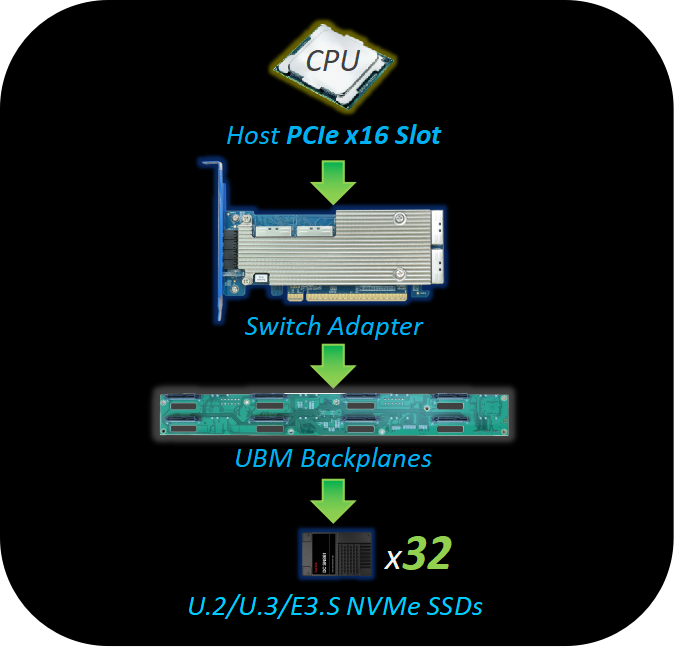
HighPoint PCIe Switching architecture enables AI Architects to easily populate ultra-high-density storage arrays, such as mounting up to 16x industry-standard M.2 NVMe devices on a single PCIe slot (via the SSD7749M2) or up to 32 NVMe devices using high-density adapters connected through MCIO or Slim-SAS backplanes.
Alternatively, if servers or workstations run out of internal chassis space for storage expansion, architects can deploy external enclosures like the RocketStor 6542AW or RS6541AW without compromising transfer speeds by leveraging a robust external CDFP/CopprLink cabling solution. Because these internal slots and external.
Solutions for Method 2: Hardware-Isolated Compute & Storage Fabrics
For environments that demand 100% hardware isolation to bypass hypervisor bottlenecks and multi-socket latency, HighPoint’s switch expansion adapters enable IT architects to configure both the compute GPU and the NVMe storage arrays onto a single physical adapter card.
1. The Localized Single-Slot GDS Matrix (Rocket 1628A)

For self-contained edge systems, industrial inspection rigs, or single-node workstation deployments, the Rocket 1628A Gen5 Switch Adapter acts as an entire GDS fabric on a single low-profile card.
Equipped with four internal MCIO 8i ports and powered by a Broadcom PEX89048 switch engine, the card can be partitioned into a localized compute-and-feed array.
The GPU Component: By aggregating two internal MCIO 8i ports and connecting them to HighPoint’s MCIO-PCIex16-G5 PCIe Bridge Card, the adapter delivers a full, uncompromised PCIe Gen5 x16 bus bandwidth to completely host a single x16 GPU accelerator card.
The Storage Component: The remaining two MCIO 8i ports map directly out to 4x independent Gen5 NVMe storage devices or link via a UBM-compliant backplane to scale up to 16 native NVMe devices.
2. The Composable External Fabric Bridge (Rocket 7600D Series)
When your architecture calls for massive external acceleration—such as server racks feeding data to external GPU chassis—HighPoint's external switch adapters split the pipeline to act as a bridging engine:
Rocket 7638D: Features a dedicated external CDFP-CopprLink port to route a full PCIe Gen5 x16 lane path out to an external eGPU enclosure (like the RocketStor 8631D-1300), while twin internal MCIO 8i ports deliver a matching PCIe Gen5 x16 local storage pipeline to feed the system.
.jpg)
Rocket 7634D: Acts as the definitive Host Interface Card (HIC), utilizing an integrated external CDFP-CopprLink port to drive a full-bandwidth external Gen5 x16 eGPU enclosure—such as the RocketStor 8631D or RocketStor 8631C arrays, or an external NVMe storage enclosure, such as a HighPint CDI Rackmount Solution—maintaining native, line-rate P2P DMA streams downstream of the host.

The Architectural Advantage
By consolidating both the GPU accelerator and the high-density NVMe flash array onto a unified local switch engine, Method 2 establishes a closed-loop, deterministic data path that operates completely independently of the host operating system or hypervisor. Data packets traveling from flash memory to GPU VRAM undergo on-chip hardware packet reflection at the PCIe Switch Core on HighPoint's Adapters. This completely bypasses the motherboard's PCIe root complex, rendering the setup 100% immune to CPU core-hopping, multi-socket inter-processor latency, and hypervisor-level Access Control Services (ACS) or IOMMU memory mapping security blocks.
In Conclusion: HighPoint Delivers Performance Without Compromise
Tier-1 Cloud Service Providers (CSPs) have long recognized the vulnerabilities of standard motherboard routing, building custom architectures where massive switch chips are soldered directly onto the system board.
Regional Managed Service Providers (MSPs) and mid-market enterprise cloud builders typically don't have access to proprietary OEM hardware templates; they build their infrastructure using standard, off-the-shelf "White-Box" server components. HighPoint's comprehensive product lineup ensures that no matter which deployment model your topology requires, you can unlock native P2P/GDS performance.
Whether you are maximizing density with slot-localized storage feeders (Method 1) or constructing hardware-isolated compute loops (Method 2), HighPoint delivers enterprise-tier fabric flexibility without the proprietary cost.